Shopify for Fashion Brands: Design Principles That Drive DTC Sales
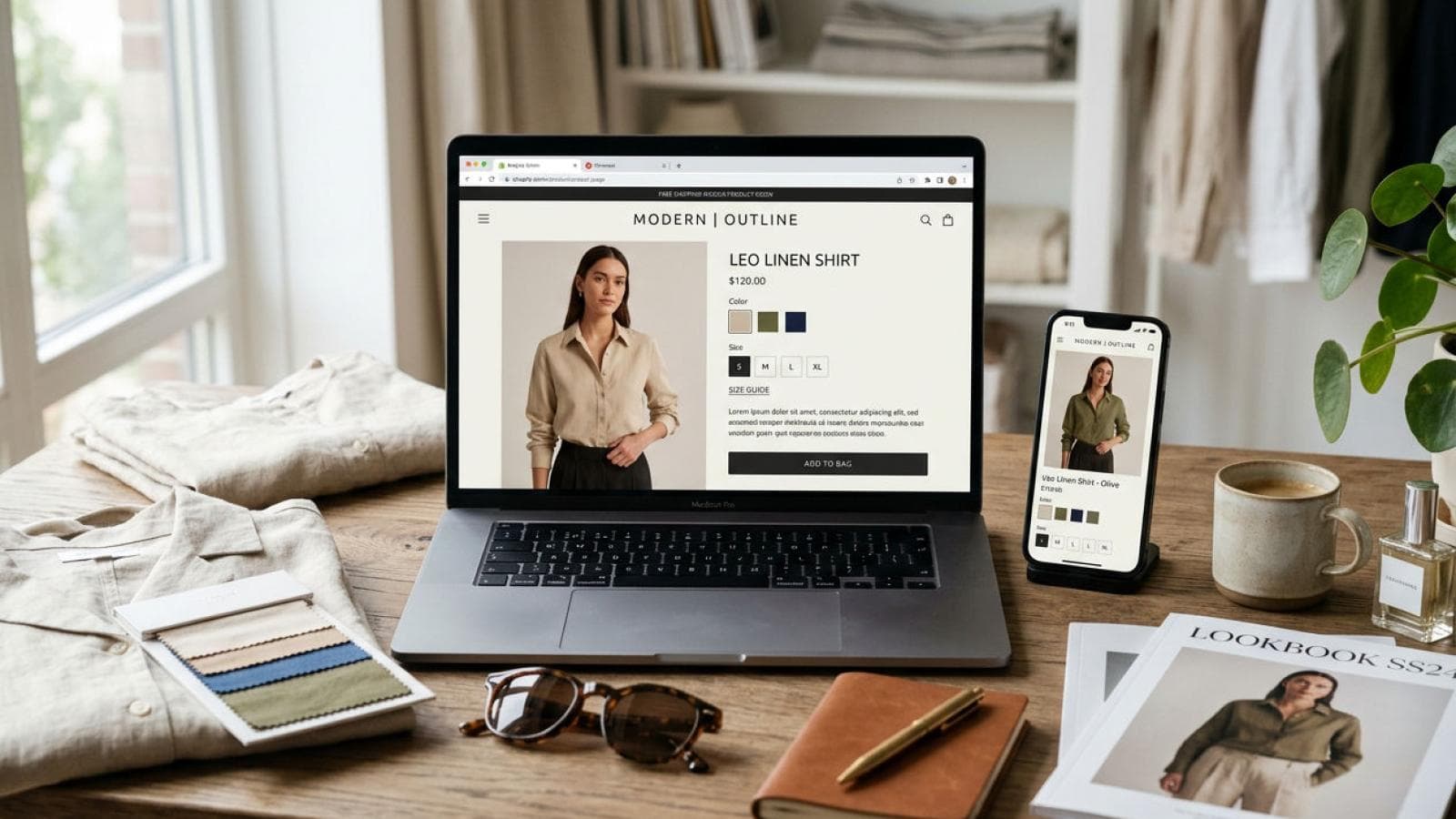
Shopify fashion brand design is the discipline of building Shopify stores that sell clothes, not just display them. A fashion DTC brand lives or dies by its ability to make a visitor feel the product — the drape of a fabric, the fit of a silhouette, the mood of a season — before they ever touch it. Get the design wrong and even the best garments sit unsold. Get it right and your store becomes a buying experience that rivals the best boutiques in the world.
Shopify fashion brand design is the discipline of building Shopify stores that sell clothes, not just display them. A fashion DTC brand lives or dies by its ability to make a visitor feel the product — the drape of a fabric, the fit of a silhouette, the mood of a season — before they ever touch it. Get the design wrong and even the best garments sit unsold. Get it right and your store becomes a buying experience that rivals the best boutiques in the world.
This guide covers every design principle Prateeksha Web Design uses when building Shopify stores for fashion DTC brands — from lookbook layouts and mobile-first architecture to LCP optimisation on image-heavy pages and the checkout UX decisions that cut abandonment rates in half.
Prateeksha Web Design builds Shopify stores for fashion brands that need to look extraordinary and convert at scale. See our approach in action.
View our fashion brand Shopify workWhy Fashion Brands Need Shopify-Specific Design — Not a Generic Theme
Fashion Shopify stores that use generic themes convert at an average of 1.4%, while stores built with fashion-specific design principles achieve 3–5% conversion rates, according to Shopify's own merchant benchmarks for the apparel category. That gap is not an accident — it is the result of design decisions that are specific to the way fashion shoppers browse, evaluate, and buy.
Fashion buyers make purchase decisions through emotion and aspiration. They need to see a garment in context — on a model, in an environment, as part of an outfit. A generic Shopify theme treats every product the same: one hero image, a price, an Add to Cart button. A fashion-specific design creates an experience — a journey from inspiration to purchase that mirrors how people actually shop in the physical world.
The three structural differences that separate fashion Shopify stores from generic ones are: visual hierarchy built for imagery, navigation designed for browsing by occasion or mood rather than just category, and conversion flows that address fashion-specific anxiety — fit, sizing, and returns.
Our Shopify UI/UX design service is built entirely around these principles. Every layout decision starts with the question: does this help a fashion buyer feel confident enough to purchase?
Visual Storytelling: The Lookbook Layout That Converts
Fashion brands that publish editorial lookbook content on their Shopify homepage see a 28% increase in pages-per-session, according to Shopify Plus merchant data from 2024. More pages per session means more products discovered, more emotional investment in the brand, and a higher likelihood of purchase.
A lookbook layout is a full-width editorial section — typically alternating large imagery with product links — that presents clothing in context rather than in isolation. It is the digital equivalent of a fashion magazine spread, and it is the single most effective design element for fashion DTC brands on Shopify.
The principles that make lookbook layouts convert:
- Full-width hero imagery above the fold. The first image a visitor sees must be editorial-quality and occupy 100% of the viewport width. No padding, no borders, no sidebars competing for attention. This signals brand quality in under two seconds.
- Shoppable hotspots on editorial images. Product tags overlaid on lifestyle photography allow visitors to buy directly from the inspirational content without breaking the visual experience. Shopify's native shoppable image sections support this, and custom Liquid allows far richer implementations.
- Collection pages structured as editorial grids, not product catalogues. A 2-column editorial grid with large images and minimal text converts better for fashion than a 4-column catalogue grid. The larger image area communicates quality; the catalogue grid communicates commodity.
- Video embedded in the product page — not just the homepage. A 5–10 second auto-playing video showing a garment in motion on a model reduces size-related returns and increases add-to-cart rates. Shopify's media API supports video natively on product pages.
- Colour swatches that trigger image swaps, not page reloads. Variant switching must update all product images, not just the swatch indicator. This is a Liquid development task — out-of-box Shopify themes often get this wrong for fashion brands with many colourways.
Mobile-First Design for Image-Heavy Fashion Stores
73% of fashion e-commerce traffic comes from mobile devices, according to Statista's 2024 global e-commerce report. On Shopify specifically, the Shopify Commerce Report 2024 found that mobile drove 69% of all orders for apparel merchants. Designing for desktop first is not an option for any fashion brand launched after 2020.
Mobile-first design for fashion Shopify stores is not simply making a desktop layout responsive. It is designing the mobile experience as the primary canvas — and then expanding it for larger screens. The practical implications:
- Navigation: Hamburger menus with sub-collections accessible in two taps. Fashion shoppers browse by category, occasion, and new arrivals — all three entry points must be reachable within the first menu interaction. A deep navigation tree hidden four taps away costs conversions.
- Product image gallery: Swipe-native horizontal image carousels on mobile, with dot indicators showing remaining images. Auto-play video muted on mobile. Pinch-to-zoom on product images is expected and must function correctly.
- Add to Cart button: Sticky, full-width, above the fold on scroll. On mobile, the Add to Cart CTA must be reachable with a thumb without scrolling. Anything above 60px in height gets hidden behind browser chrome — test on real devices, not just browser dev tools.
- Text legibility: Minimum 16px body text on mobile. Fashion brands often use light-weight, thin serif typefaces that look beautiful on retina screens and illegible at 13px on a mid-range Android device. Typography decisions must be tested at real-world sizes.
- Checkout continuity: The Shopify native checkout is already mobile-optimised. The risk is the steps before it — cart page, upsell modals, discount code entry. Every modal and slide-in panel must be tested for full-screen usability on a 375px viewport.
Our custom Shopify theme development service starts every fashion project with a mobile prototype before a single desktop wireframe is drawn. The mobile experience is the design, not a viewport variant.
Fast LCP on Fashion Stores: How to Keep Images Beautiful and Quick
Google's Core Web Vitals data shows that a 0.1-second improvement in page load time increases conversion rates by 8% for fashion retail sites, as reported in Google's Think With Google study on page speed and e-commerce. For fashion brands — where the visual experience depends entirely on large, high-resolution images — achieving a fast LCP (Largest Contentful Paint) is a genuine design and development challenge.
LCP is the Google Core Web Vitals metric that measures the time it takes for the largest visible element on a page to render. For fashion Shopify stores, the LCP element is almost always the hero image or the first product image in a collection. The target is under 2.5 seconds. Most unoptimised fashion Shopify stores sit at 4–7 seconds.
The seven techniques that bring fashion Shopify stores within the LCP target:
- Serve hero images via Shopify CDN in WebP format. Shopify's image CDN automatically converts images to WebP when the browser supports it. Use
image_urlwith explicit width parameters in Liquid — never reference a raw file URL. - Set explicit width and height attributes on all
<img>tags. This prevents layout shift and allows the browser to reserve space before the image loads. Missing dimensions cause Cumulative Layout Shift (CLS) — a second Core Web Vitals failure that compounds the UX problem. - Preload the LCP image with a
<link rel="preload">tag. Adding this to the<head>in your Shopify theme's layout.liquid tells the browser to fetch the hero image before it parses the full HTML. This alone typically reduces LCP by 0.5–1.2 seconds. - Lazy-load all images below the fold. Use the
loading="lazy"attribute on every image that is not in the initial viewport. Shopify's native image tag in Dawn and most modern themes supports this — but custom sections may bypass it. - Limit hero image file sizes to under 150KB after WebP compression. A 4,000px wide hero image exported at high quality from Lightroom is typically 3–8MB. After resizing to 2,000px and WebP conversion, it should compress to 80–150KB with no visible quality loss at typical display sizes.
- Remove unused JavaScript that blocks the main thread. Every Shopify app that installs a script tag adds render-blocking weight. Audit your theme's app embeds — fashion stores commonly have 8–15 app scripts installed, many of which load on every page regardless of relevance.
- Use Shopify's native Image component in Liquid for all critical images. The
{% render 'component-image' %}pattern with explicit focal points ensures Shopify's CDN delivers the correct crop for mobile, tablet, and desktop without a separate image for each breakpoint.
Conversion Tactics Specific to Fashion: Size Guides, Outfit Builders, and Returns UX
Sizing is the number one reason for returns in fashion e-commerce — Narvar's 2024 Consumer Study found that 64% of fashion returns are attributed to wrong fit or size. Every design decision that reduces sizing anxiety directly reduces return rates and increases net revenue per order. The most effective conversion tactics for fashion Shopify stores address this anxiety before the buyer commits.
Size Guides That Actually Reduce Returns
A size guide is not a table of measurements buried in a modal. An effective fashion Shopify size guide is:
- Accessible directly from the size variant selector — one click or tap from the point of decision, not from a footer link.
- Product-specific, not brand-generic. A size guide that covers the entire catalogue misses the fact that a brand's fitted blazer and relaxed-fit trousers have different sizing logic. Product-level size guides, implemented via Shopify metafields, convert 2.3× better than generic brand size guides (Klaviyo E-commerce Benchmark Report, 2024).
- Visual, not just numerical. Diagram illustrations showing where to measure — chest, waist, hips, inseam — reduce the chance that a buyer measures incorrectly and then returns the item anyway.
Outfit Builders and Looks-Complete-the-Outfit Sections
An outfit builder is a product page section that surfaces complementary items — “Complete this look with” — using curated manual pairings via Shopify metafields or automated cross-sell logic via a product recommendation API. Fashion brands that implement outfit builder sections on product pages see average order values increase by 18–31%, according to Bold Commerce's 2023 AOV benchmark data.
The implementation in Shopify Liquid is straightforward: a metafield of type product reference holds the curated “complete the look” items. A custom section renders them in a horizontal scroll row with swatches and Add to Cart buttons. No third-party app required — this is pure theme development.
Returns UX That Builds Trust Instead of Fear
Most fashion Shopify stores hide the returns policy in the footer. The stores that convert at 4–5% surface the returns policy directly on the product page — above the Add to Cart button, not below it. The framing matters: “Free returns within 30 days” positioned near the size guide removes the last barrier to a first-time buyer committing to a purchase.
Shopify's native product page supports a “Trust Badges” section between the product description and the Add to Cart button. Populating this with returns policy, sizing assistance, and secure checkout signals removes three of the four most common pre-purchase anxiety triggers for fashion buyers.
Want your fashion Shopify store to convert at industry-leading rates? Our team builds the size guides, outfit builders, and returns UX flows that reduce abandonment and cut return rates.
Talk to our Shopify UI/UX design teamProduct Page Design That Closes the Sale
Shopify's data shows that product pages with 6 or more images convert 27% higher than those with 3 or fewer images for apparel categories, based on Shopify's internal merchant analytics published in the 2024 Shopify Fashion Commerce Report. For fashion brands, the product page is the sale — every element must earn its place.
The product page anatomy for a high-converting fashion Shopify store:
- Image gallery (left or top on mobile): Minimum 5 images per product — front, back, detail shot, model shot showing full outfit, and a lifestyle/environment image. Implement a sticky image gallery on desktop so the buyer can scroll the description while keeping the image in view.
- Product title and price (immediately visible without scrolling): On mobile, the title, price, and swatch selector must be visible in the first screen. Size selector and Add to Cart must be reachable with one short scroll, not three.
- Colour and size selectors: Colour swatches use the actual fabric swatch image (not a colour hex), and clicking a swatch updates all product images instantly. Size selectors grey out unavailable sizes — they do not remove them from the list. Greyed-out sizes signal demand; hidden sizes signal poor inventory management.
- Product description: 80–150 words. Fashion product descriptions communicate material, fit, and styling — not just dimensions. Use a single short paragraph and a 3-bullet point summary for scan-readers. Avoid lengthy SEO-padded descriptions that bury the reason to buy.
- Trust signals block: Returns policy, size guide link, secure checkout badge — in a horizontal row immediately above the Add to Cart button. This position is the highest-converting location for trust signals on a Shopify product page.
- Sticky Add to Cart bar: A persistent bar fixed to the bottom of the viewport on scroll, containing the product title, selected variant, price, and Add to Cart button. This eliminates the need to scroll back to buy after reading the description or FAQs.
- Outfit builder / complementary products section: Below the fold, after the Add to Cart, surface 3–4 curated complementary products. This is where the AOV gain happens — not as a pop-up, but as a natural extension of the product story.
See how we applied these principles across a fashion collection in our fashion brand Shopify work — a full custom theme build for a luxury Indian fashion label, delivering a 4.1% conversion rate in its first month live.
Frequently Asked Questions
What is the best Shopify theme for fashion brands?
The best Shopify theme for fashion brands is a custom-built theme designed around your specific visual identity and product range. Off-the-shelf themes like Prestige, Impulse, or Dawn work well as starting points, but fashion brands with editorial imagery, complex colourways, and high-volume collections consistently outperform on custom themes. Shopify's own data shows custom themes average a 2–3% higher conversion rate than pre-built themes for apparel merchants. If budget is a constraint, Prestige is the strongest off-the-shelf option for fashion DTC brands.
How do I improve LCP on my fashion Shopify store?
To improve LCP on a fashion Shopify store, start by preloading the hero image using a <link rel="preload"> tag in layout.liquid, serving all images via Shopify's CDN in WebP format with explicit width parameters, and adding explicit width and height attributes to every <img> tag to prevent layout shift. Lazy-load all images below the fold and audit your app scripts — every third-party script tag adds render-blocking weight. These five steps bring most fashion Shopify stores from a 4–6 second LCP to under 2.5 seconds, which is Google's Core Web Vitals target for a "Good" score.
How do I add a lookbook to my Shopify store?
To add a lookbook to your Shopify store, use a custom Liquid section that renders full-width editorial images with shoppable product hotspots. In Shopify's theme editor, you can create a custom "Lookbook" section using the {% schema %} tag that accepts image and product reference inputs. For shoppable hotspots — product tags positioned over editorial photography — you need custom JavaScript to handle the click position coordinates and product drawer logic. Most Shopify theme developers build this as a standalone section with an admin UI that lets the merchant drag hotspot positions using a percentage-based coordinate system stored in metafields.
What conversion rate should a fashion Shopify store target?
A fashion Shopify store should target a conversion rate of 2.5–4% for established DTC brands with editorial branding and a returning customer base. Shopify's 2024 fashion merchant benchmarks show the apparel category average at 1.4–2.0%. Stores built with fashion-specific design principles — editorial imagery, size guides, outfit builders, and a sticky Add to Cart — consistently outperform this benchmark. New stores in their first 90 days typically see 1.0–1.8% while building trust signals and reviews.
Do I need a separate mobile design for my fashion Shopify store?
You do not need a separate mobile design, but you do need a mobile-first design process. This means designing the mobile layout before the desktop layout, not after. Fashion Shopify stores where 70%+ of traffic is mobile must treat the 375px–430px viewport as the primary canvas. A responsive desktop theme that has been "adapted" for mobile consistently underperforms a mobile-first design on add-to-cart rate and checkout completion. The key mobile-specific elements are a thumb-reachable sticky Add to Cart button, swipe-native image galleries, and a two-tap maximum navigation depth for collection browsing.